Windows Phone 7 Charts
09 Dec 2010One of the big features of my Windows Phone 7 Google Analytics Client – Phonealytics is the nice (I think) looking graphs. After briefly considering porting an existing Silverlight solution to wp7 I stumbled upon Quick Charts by amCharts. Quick Charts is a lightweight and more importantly free chart control for Windows phone 7. It’s a bit light on options but very easy to get working and looks good.
The xaml for a line chart is pretty straightforward. You can see I am using the phone’s inbuilt styles partially because it looks awesome and partially because I am a terrible designer. The things to note here are setting the CategoryValueMemberPath to the name of the property in your model you want the graph to use as the label and in the LineGraph section setting the ValueMemberPath to the property you want to chart. The title property of the LineGraph renders on a small legend. One tip I have is setting IsEnabled to false when the graph is loading (or just in general) I got an exception tapping the graph before any data has been bound.
<amcharts_windows_quickcharts:serialchart isenabled="False" datasource="{Binding GraphData}" x:name="chtMain"
categoryvaluememberpath="Label" verticalalignment="Top">

    <amcharts_windows_quickcharts:serialchart.foreground>
        <solidcolorbrush color="{StaticResource PhoneForegroundColor}" />
    </amcharts_windows_quickcharts:serialchart.foreground>

    <amcharts_windows_quickcharts:serialchart.borderbrush>
        <solidcolorbrush color="{StaticResource PhoneBorderColor}" />
    </amcharts_windows_quickcharts:serialchart.borderbrush>

    <amcharts_windows_quickcharts:serialchart.axisforeground>
        <solidcolorbrush color="{StaticResource PhoneForegroundColor}" />
    </amcharts_windows_quickcharts:serialchart.axisforeground>

    <amcharts_windows_quickcharts:serialchart.background>
        <solidcolorbrush color="{StaticResource PhoneBackgroundColor}" />
    </amcharts_windows_quickcharts:serialchart.background>

    <amcharts_windows_quickcharts:serialchart.graphs>
        <amcharts_windows_quickcharts:linegraph title="Visits" valuememberpath="Value" strokethickness="5">
            <amcharts_windows_quickcharts:linegraph.brush>
                <solidcolorbrush color="{StaticResource PhoneAccentColor}" />
            </amcharts_windows_quickcharts:linegraph.brush>
        </amcharts_windows_quickcharts:linegraph>
    </amcharts_windows_quickcharts:serialchart.graphs>

</amcharts_windows_quickcharts:serialchart>
I use an ObservableCollection of the super simple ChartDataPoint class below, with just the top properties I set on the chart xaml above.
public class ChartDataPoint
{
    public string Label { get; set; }
    public double Value { get; set; }
}
Here is a screen of the resulting graph with a dark / blue theme.

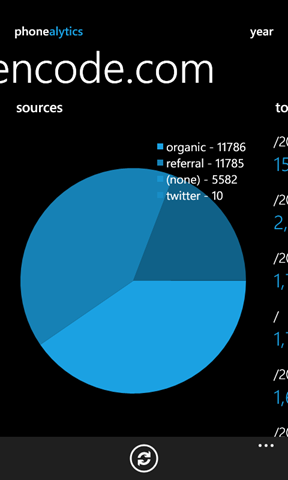
Quick charts also allows for some pretty delicious pie charts. Here is one I prepared earlier:
<amcharts_windows_quickcharts:piechart margin="0" isenabled="False" titlememberpath="Label"
valuememberpath="Value" datasource="{Binding PieData}">
    <amcharts_windows_quickcharts:piechart.brushes>
        <solidcolorbrush color="{StaticResource PhoneAccentColor}" />
        <solidcolorbrush color="{StaticResource PhoneAccentColor}" opacity="0.8" />
        <solidcolorbrush color="{StaticResource PhoneAccentColor}" opacity="0.6" />
        <solidcolorbrush color="{StaticResource PhoneAccentColor}" opacity="0.4" />
        <solidcolorbrush color="{StaticResource PhoneAccentColor}" opacity="0.2" />
        <solidcolorbrush color="{StaticResource PhoneAccentColor}" opacity="0.1" />
    </amcharts_windows_quickcharts:piechart.brushes>
    <amcharts_windows_quickcharts:piechart.foreground>
        <solidcolorbrush color="{StaticResource PhoneForegroundColor}" />
    </amcharts_windows_quickcharts:piechart.foreground>
</amcharts_windows_quickcharts:piechart>
Again I am using the default phone colours, this time I set a few brushes with different opacities. These will be used depending on the number of slices in your pie. Speaking of pie, here is what it looks like.